
Free & open source · macOS
Give every
feature
its moment.
Kookaburra Cut is a local, open-source studio for product films: AI-authored scenes, device mockups front and centre, every social format from one project. The call carries across the quiet; nothing leaves your Mac.
Download for MacVery early buildKookaburra Cut is just getting started. It may crash, slow down or render oddly, lighting is rough, and what's here is limited. Taking shape quickly; expect sharp edges.
Brief it. Build it.
Export it.
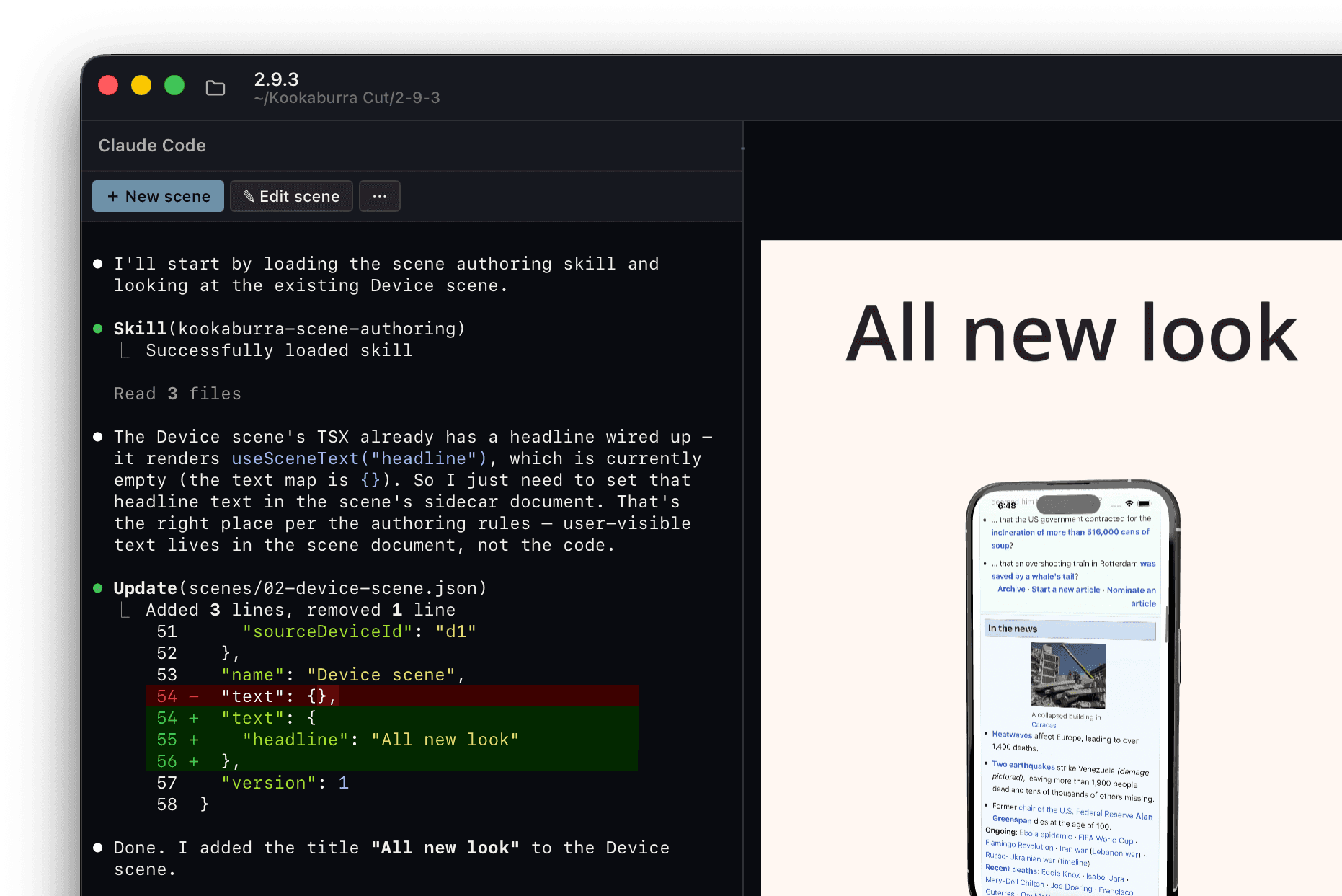
Claude Code, in the app rail
Brief: describe the film
Tell the embedded AI what you want, or scaffold a device scene from a starter. It's a brief, not a prompt ritual.
Build: editable scenes on the stage
Claude Code and the toolkit build real scenes: text motion, counters, camera moves. Scrub, tweak, swap anything. Skip AI anytime; the wizards and edit bar are enough.
Export: identical, frame for frame
4K masters and social presets, rendered on your Mac. Your cut is ready: the same film, every time, byte for byte.
Main features
AI-authored films
Describe what you want; Claude Code builds editable scenes from a typed toolkit. Optional: the wizards work without it.
Device mockups front and centre
A screen recording on a studio-lit 3D handset: motion presets, soft shadows, per-scene camera orbit.
Motion that looks finished
Nine headline presets, counters, lockups, ten transitions, LUT grades and film grain. Deterministic, all of it.
One project, every feed
16:9, 9:16, 1:1 and 4:5 from one safe-area-aware layout, with platform presets for size and loudness.
Fully local
Preview and export run entirely on your Mac. Unreleased UI and client footage stay where they are.
Free & open source
Download the notarised app. Pay Claude only if you use the AI authoring path. No seat, no render fee.
Your app,
on a handset.
The screen is real media, frame-locked to the timeline. Orbit the camera, pick a colourway, stage it on a floor with true soft shadows, and export every aspect from one project.
recording
Ten looks, ready to wear.
Or duplicate one and make it yours. STUDIO WHITE
 PACIFIC
 PAPER
PAPER GALLERY
 SUNRISE
 LOFT
LOFT MIDNIGHT
 NEON
NEON ABYSS
ABYSS EMBER
EMBEROne project.
Every feed.
Layout once, safe-area aware. Then one click toward the platform:
Instagram & Facebook Reels · Meta feed · TikTok · YouTube · YouTube Shorts · LinkedIn Organic · LinkedIn Ads · X · Reddit · Telegram · CTV · Web · Kookaburra Master · Kookaburra Standard
H.264 · H.265 · ProRes 422 HQ masters · up to 4K · loudness targeting
Free, open source
Download the notarised Mac app. Yours: no seat, no cloud render fee.
Optional Claude
AI authoring runs on your own Claude subscription, only if you want that path.
Local by default
Your Mac is the render farm. Nothing is uploaded to render.
Specs
- Platform
- macOS · Apple Silicon
- Rendering
- Single WebGL canvas · 60 fps
- Resolution
- Up to 4K
- Video
- H.264 · H.265 · ProRes 422 HQ
- Audio
- Soundtrack layer · AAC / PCM
- Determinism
- Byte-identical re-exports
Questions
Do I need a Claude subscription?
No. Wizards and the edit bar work without it. Claude Code is the optional AI-authoring path, on your own subscription.
Is this a generative video model?
No. You get an editable project and the same export every time, not prompt → surprise clip.
Can it mix dialogue or multi-track audio?
Not yet. Clips are picture-only today; music is a per-project soundtrack layer.
Windows, or Intel Macs?
No. macOS on Apple Silicon only.

Make what's new
worth watching.
Your latest work, given a clear moment, and your cut is ready, identical every time.
Download for MacNotarised .app · macOS (Apple Silicon) · Free & open source